
Choosing a Korea SIM card is the first thing most travelers sort out on landing. This guide is for foreign visitors arriving in Seoul or Busan who want their phone online the moment they clear immigration — for maps, KakaoTalk, taxi apps and translation. Here is the bottom line for most travelers in 2026. If your phone supports eSIM, buy an eSIM before you fly and skip the airport queue entirely. If it does not, grab a physical Korea SIM card at an Incheon Airport counter. Reserve a pocket Wi-Fi egg only if several people need to share one connection. Below we compile current prices from official operator and reseller sites as of mid-2026, with honest notes on where each option trips people up.
Korea SIM card, eSIM or Wi-Fi egg: the three ways online
Korea runs on three mobile networks: SK Telecom (SKT), the largest and generally rated best for rural and subway coverage; KT; and LG U+, usually the cheapest. Almost every “tourist SIM” or “Korea eSIM” you see sold online is one of these three networks resold under a brand name. Your three practical choices are:
- Physical tourist SIM — a plastic nano-SIM you swap into your phone. Works on any unlocked handset, including older ones.
- eSIM — a digital profile you install from a QR code. No plastic, nothing to lose, but only newer phones support it.
- Pocket Wi-Fi (a “Wi-Fi egg” or router) — a rented pocket device that broadcasts Wi-Fi to several phones and laptops at once.
Physical SIM, eSIM or Wi-Fi egg: the quick comparison
Prices below are compiled from official KT, SKT and LG U+ tourist pages and from resellers Airalo, Klook and Trazy. Figures below use an exchange rate of roughly ₩1,370 to US$1 (late September 2026). The won has strengthened sharply since July (about ₩1,550 then), so won-priced plans now cost a little more in dollars.
| Option | Setup | Typical price | Best for |
|---|---|---|---|
| eSIM (data-only) | Buy online, scan QR code over Wi-Fi before or on arrival; passport ID check at purchase | ~US$12 (3 days) to ~US$69 (30 days) unlimited — roughly ₩16,500–₩94,500 | Modern phones (iPhone XS or newer, Galaxy S20+, Pixel 3+); solo travelers who want zero airport hassle |
| Physical tourist SIM | Pre-order online for airport pickup, or buy at an Incheon counter; passport shown for registration | ~₩25,000 (5 days) to ~₩65,000 (30 days) unlimited — roughly US$18–$47 | Older or eSIM-incompatible phones; anyone who prefers a physical card and a staffed counter |
| Pocket Wi-Fi egg | Reserve online, collect device at airport counter with a credit-card deposit; charge nightly | ~₩3,400–₩6,300 per day (about US$2.50–$4.60/day) plus deposit | Families or groups sharing one connection; laptop users; keeping your home SIM active |
What a Korea SIM card and its rivals actually cost
Most tourist plans are marketed as “unlimited,” but many throttle to slower speeds after a daily high-speed cap — fine for maps and messaging, less so for heavy video. Data-only eSIMs are the cheapest headline prices; plans that add a Korean 010 phone number with voice and text cost more. Here is a representative snapshot of unlimited-data pricing in mid-2026.
| Length | SKT eSIM (via Airalo, unlimited) | LG U+ eSIM (unlimited) | LG U+ physical SIM (online, unlimited) |
|---|---|---|---|
| 3 days | ~US$12 (₩16,500) | — | — |
| 5 days | ~US$20 (₩27,500) | — | ~₩25,000 (US$18) |
| 7 days | ~US$29 (₩40,000) | — | ~₩32,000 (US$23) |
| 10 days | ~US$35 (₩48,000) | ~US$32 (₩44,000) | ~₩35,000 (US$26) |
| 30 days | ~US$69 (₩94,500) | ~US$62 (₩85,000) | ~₩65,000 (US$47) |
Two patterns stand out. First, LG U+ is consistently the budget pick, and its physical SIM often undercuts eSIMs for longer stays. Second, for a typical 5–10 day trip almost everyone pays somewhere between ₩30,000 and ₩55,000 (US$22–$40) — the choice is less about money than about convenience and whether your phone takes an eSIM. Cheaper capped plans exist too: Klook, for instance, lists small fixed-data bundles from around US$7 for travelers who barely use data.
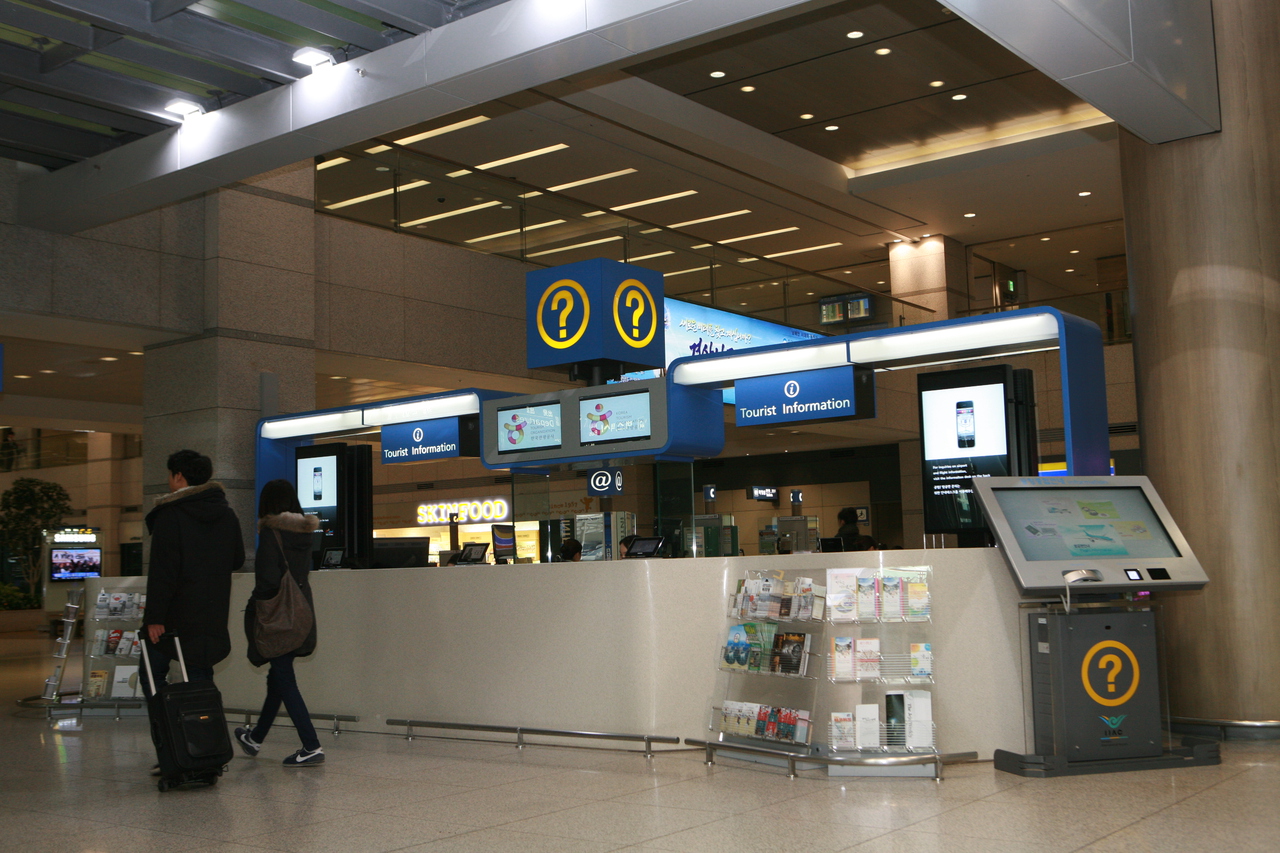
Incheon’s arrivals hall, where the telecom and information counters sit side by side — Source: Korea Tourism Organization 관광사진갤러리 (KOGL Type 1)
Where to buy: Incheon Airport counters vs pre-ordering online
At Incheon Airport Terminal 1, SKT, KT and LG U+ all run arrivals-hall counters. All three carriers run 24-hour arrivals counters in both Terminal 1 and Terminal 2, so a late landing isn’t a problem. Buying on the spot is simple and staff speak English, but at peak arrival times queues form, and walk-up prices run a little higher than online.
Pre-ordering through Klook, Trazy or Airalo is usually cheaper, as is an operator’s own English site. You then either collect a physical Korea SIM card at a dedicated pickup counter, or install an eSIM before you leave home. Airalo and similar app-based eSIMs need no counter at all: you buy in the app, verify your passport, and the profile is ready to switch on when you land. If you go the physical-SIM route but want to skip lines, reserve online for airport pickup rather than buying at the walk-up desk.
eSIM compatibility, and the passport rule on every Korea SIM card
An eSIM only works if your handset supports it. As a rule of thumb that means an iPhone XS or newer, a Samsung Galaxy S20 or newer, or a Google Pixel 3 or newer — and, crucially, a phone that is carrier-unlocked. Some phones sold in Japan and Hong Kong have eSIM disabled, so check your settings for an “Add eSIM” option before you buy. If in doubt, a physical SIM sidesteps the whole question.
Korea requires identity verification for prepaid mobile service, so every option — SIM or eSIM — asks for your passport at purchase or activation. For an eSIM you typically upload passport details in the app, then receive a QR code to scan. Install it over Wi-Fi. Many issuers require activation within 48 hours of purchase, so don’t buy weeks early. Physical SIMs are registered against your passport at the counter. Keep your passport handy either way.
Once you are connected, most visitors load a maps app and a translator first. Our Places guides cover where to go next. Many head straight out to Myeongdong for shopping and street food or Hongdae for nightlife. Data coverage is strong across central Seoul, including inside subway stations and around big sights like Gyeongbokgung Palace and the alleys of Insadong.
Honest caveats: what can go wrong
- No Korean phone number on data-only plans. Most cheap eSIMs are data-only, so you cannot receive SMS one-time codes. Some Korean apps, delivery services and even a few restaurant reservation systems want a local 010 number to verify you. If that matters, choose a plan that explicitly includes a number (KT, SKT “Gold”-tier and some Airalo Korea plans offer voice/text) — expect to pay more.
- eSIM support is not universal. Older, budget or region-locked phones may not take an eSIM at all. Confirm compatibility before you pay; refunds on activated eSIMs are limited.
- “Unlimited” often means throttled. Many plans cut high-speed data to a slower tier after a daily cap. It rarely bothers map-and-message users, but heavy streamers or hotspot users should read the fine print.
- Pocket Wi-Fi has a catch or two. The egg needs charging, so carry a power bank. Everyone loses signal if the person holding it wanders off. You must also return the device and reclaim your credit-card deposit before flying home.
- Coverage gaps are rare but real. All three networks blanket cities; deep-mountain hiking trails and some remote islands can drop out. SKT has the edge in rural areas.
- Buy from reputable sellers. Stick to the operators, Klook, Trazy or Airalo. Very cheap third-party listings occasionally deliver short validity or slow throttling that differs from what was advertised.

Sort your connection before you leave Incheon — options thin out once you are on the road — Source: Korea Tourism Organization 관광사진갤러리 (KOGL Type 1)
Korea SIM card, eSIM or egg: which should you get?
For a solo traveler on a modern phone, an eSIM is the cleanest answer — install it on the plane, land connected, no counter. If your phone can’t take an eSIM, a physical LG U+ or SKT tourist SIM costs about the same and is a two-minute counter transaction. Choose a pocket Wi-Fi egg when two or more of you are sharing, when you need a laptop online, or when you want to keep your home SIM live for calls. And if you genuinely need a Korean number for app verifications, pay the small premium for a voice-and-text plan rather than data-only.
Verified as of September 2026. Korea SIM card prices, plan tiers and airport counter locations change frequently, and the won–dollar rate has been volatile this year. Confirm current figures on the operator or reseller site before you buy.